

Email attachments को extra protection क्यों चाहिए
Providers के बीच standard email transit में (TLS से) encrypted होता है लेकिन end-to-end नहीं। मतलब:- आपका email provider contents read कर सकता है।
- Recipient का email provider contents read कर सकता है।
- अगर message forward हो जाए, archive हो जाए, या search index में pull हो जाए, copies उन जगहों पर बैठती हैं जिन्हें आप control नहीं करते।
- Shared inboxes (info@, accounts@) के अक्सर sender से ज़्यादा readers होते हैं।
- Email backups regulated industries में सात साल या उससे ज़्यादा persist कर सकते हैं, original message inbox से delete होने के बाद भी।
- एक subpoena, internal investigation, या inadvertent legal hold years बाद उन backups से message वापस pull कर सकता है।
Step-by-step: अपना PDF encrypt करें
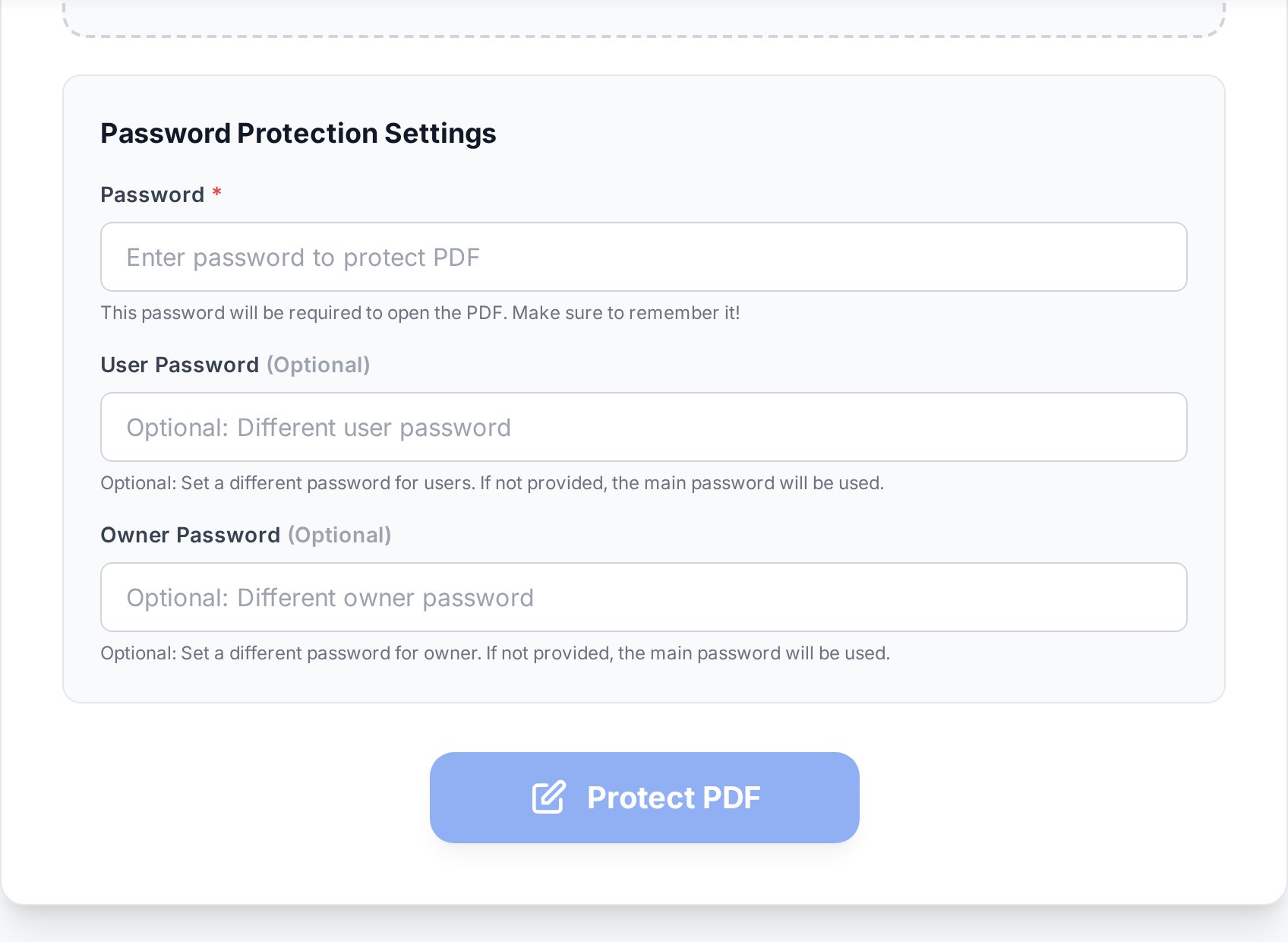
- PDF password-protect tool खोलें और अपनी file upload करें। Original आपके device पर unchanged रहता है।
- Strong password set करें। Recipient को exactly यह string चाहिए, इसलिए carefully type करें और दो बार typing के बजाय password manager से paste करें।
- Encryption level confirm करें। Modern tools AES-256 default करते हैं, जो वही standard है जो banks और government agencies use करती हैं। पुराने RC4 और AES-128 modes compatibility के लिए अब भी exist करते हैं लेकिन avoid किए जाने चाहिए जब तक recipient ancient software नहीं चला रहा (Acrobat 8 और earlier, पुराने industrial systems में कुछ embedded readers)।
- Encrypted file download करें। Password के साथ इसे एक बार खुद open करें verify करने के लिए कि सब काम कर रहा है, फिर अपने email में attach करें।
Send करने से पहले verify करें। Encrypted file को password के साथ खुद open करें, उस viewer में जो recipient likely use करेगा। बहुत सी "encryption broken" complaints password में typos निकलती हैं, email जाने के बाद ही पकड़ी जाती हैं।Quirk worth flagging: अगर आप password manager से password copy करते हैं और आपका manager auto-add करता है trailing space या smart-quote character, तो recipient की plain-text password attempt match नहीं करेगी। Whitespace strip करें और किसी भी "curly" quotes (' ' " ") को manager में password save करने से पहले straight ASCII quotes (' ") से replace करें। यह लगभग आधी "encryption broken" tickets के लिए silent failure mode है जो मैंने colleagues को raise करते देखी हैं। अगर document भी draft है या sensitive markings रखता है, आप confidential watermark भी add कर सकते हैं ताकि कोई भी जो access करे clearly देखे कि content restricted है।
Password को safely कैसे share करें
यह workflow का वो आधा है जो skip हो जाता है, और यह वो आधा है जो decide करता है कि आपका encryption actually कुछ protect करता है या नहीं।अलग channel use करें
Rule simple है: password को ऐसे route से travel करना है जिसका email से कुछ नहीं लेना देना। Good options:- SMS या messenger. Password को text या Signal या WhatsApp जैसे end-to-end encrypted messenger से भेजें। Phone number email account से separate identity है।
- Password manager share link. 1Password, Bitwarden, और Dashlane सभी "share an item" या "share via link" features offer करते हैं जो single view या set time के बाद expire हो जाते हैं।
- In person या phone पर verbal handoff. Old-fashioned, लेकिन bulletproof. High-value items के लिए useful जो आप call कर सकें।
- Secret-sharing services. Bitwarden Send या one-time-secret services जैसे tools आपको ऐसा link generate करने देते हैं जो एक open के बाद खुद destroy हो जाता है।
- Out-of-band ticketing system. अगर दोनों parties shared service desk (Jira Service Desk, Zendesk) use करती हैं, password private comment के रूप में travel कर सकता है जो email thread से separate है।
- "Password अगले email में है।" Same inbox, same audit trail, same forwarders. Encryption अब speed bump है।
- Subject line में Password. Same problem, extra visibility के साथ।
- Predictable patterns ("password recipient का last name है")। कोई भी जो guess कर सकता है उसे password नहीं चाहिए।
- Mixed Apple और Android devices के बीच iMessage. अगर recipient iMessage पर नहीं है, message plain SMS पर fall back होता है, जो carrier infrastructure पर unencrypted बैठता है।
- Voicemail. कई corporate voicemail systems recordings inboxes में store करते हैं जो email से integrate होते हैं और transcribed और indexed हो सकते हैं।
ऐसा password choose करना जो crack नहीं होगा
PDF encryption password से encryption key derive करता है। Weak passwords offline brute-force हो जाते हैं attacker के पास file होने के बाद। इसे hard बनाएँ।- Length over complexity. 16-character random string पाँच symbols वाली 10-character string से बेहतर है। "PurpleDolphinChairOcean42" "P@55!" से stronger है।
- Personal data avoid करें. Recipient का name, birthday, company, और pet सब quick LinkedIn check से guessable हैं।
- Generate करें, invent मत करें. अपने password manager का generator use करें। यहाँ तक कि 4-word diceware passphrase भी आपके बनाए गए कुछ से dramatically ज़्यादा secure है।
- Auto-correct होने वाले characters avoid करें. कुछ keyboards (especially mobile) certain ASCII punctuation को smart equivalents से auto-replace कर देते हैं। Platforms पर sharing कर रहे हैं तो letters और digits पर stick करें।
Open password vs permissions password
PDF encryption दो different passwords support करता है, और वे different jobs करते हैं:| Password type | क्या करता है | कब use करें |
|---|---|---|
| Open / user password | Document देखने के लिए ही ज़रूरी। इसके बिना, file unreadable ciphertext है। | जब भी content खुद confidential हो। |
| Permissions / owner password | Restrict करता है viewer क्या कर सकता है (printing, copying text, modifying)। Doc फिर भी इसके बिना open होता है। | उन documents के लिए जो readable होने चाहिए लेकिन edit या copy न हों (form templates, distributed reports)। |
Encryption के around email tips
दो practical notes जो लोगों को अक्सर bite करते हैं:- Compressing से पहले encrypt करें. अगर PDF email करने के लिए भी बहुत बड़ा है, बाद में करने के बजाय compress पहले फिर encrypt step run करें। कुछ compressors quietly file को इस तरह re-encode करते हैं कि encryption strip हो जाता है।
- Recipient को बताएँ कि यह encrypted है. Email body में एक छोटी note ("यह PDF password-protected है। मैं अभी SMS से password भेजूँगा।") file को corrupt या quarantined के रूप में flag होने से रोकती है।
- Spam-filter false positives से सावधान रहें. Encrypted attachments malware के लिए scan नहीं हो सकते, इसलिए corporate spam filters कभी-कभी उन्हें flag या quarantine करते हैं। Recipient को warn करें कि अगर वो email कुछ minutes में न दिखे तो spam folder check करें, और high-value sends के लिए IT को advance में inform करें।
- Password को "backup" के रूप में खुद को email न करें. अगर कोई आपके inbox को breach करे, Sent folder में file और Inbox में password दोनों available हैं। Password को सिर्फ़ अपने password manager में store करें।
अगर आप password भूल जाएँ तो क्या करें
Unencrypted original को कहीं safe रखें। Encryption symmetric है: अगर आप password lose कर देते हैं, file legitimate means से effectively unrecoverable है। AES-256 brute-force किसी normal timescale पर realistic नहीं है - sun का heat death usual humorous estimate है। अगर आप document own करते हैं और password lose कर दिया लेकिन original है, नए password से re-encrypt करें और file replace करें। अगर आपके पास सिर्फ़ encrypted copy है और आप genuinely इसके rights own करते हैं, ऐसे tools हैं जो PDF unlock आप own करते हैं जो weak protections removal attempt कर सकते हैं, लेकिन वे strong AES-256 password crack नहीं करेंगे। (Weak protections के लिए - 2003-era exports से "permissions only" PDFs - removal trivial है। Long password वाले real AES-256 के लिए, give up करें।)FAQ
क्या AES-256 encryption legal documents के लिए strong enough है?
हाँ। AES-256 US National Security Agency द्वारा top-secret material के लिए approved है और banks, governments, और major cloud providers द्वारा use होता है। PDF security में weak link लगभग हमेशा password होता है, algorithm नहीं।
क्या मैं password same email में भेज सकता हूँ अगर बाद में delete कर दूँ?
नहीं। Email servers में replicate होता है, backed up होता है, archived होता है, और forwarded होता है। "Send के बाद delete" सिर्फ़ आपकी local copy delete करता है और उन dozens of other places के बारे में कुछ नहीं करता जहाँ message exist करता है। अलग channel use करें।
अगर recipient password भूल जाए तो क्या होगा?
आप password को secure channel से re-send करते हैं। अगर उन्होंने file और password दोनों खो दिए हैं, आप अपना original नए password से re-encrypt करते हैं और re-send करते हैं। Password-protected PDF का कोई recovery code या master key नहीं है।
क्या encryption PDF का file size change करेगा?
थोड़ा। Encryption security handshake metadata के लिए कुछ hundred bytes add करता है। Actual content in place encrypted होता है, इसलिए 5 MB PDF लगभग 5.001 MB बन जाता है। आपको email size limit के पार push करने के लिए काफ़ी नहीं।
क्या recipient open करने के बाद password remove कर सकता है?
हाँ। एक बार उनके पास password है, वे किसी भी standard PDF tool से encryption remove कर सकते हैं। अगर आपको persistent protection चाहिए जो recipient की actions survive करे, अकेले encryption answer नहीं है। इसे watermarks और clear access policy के साथ combine करें, और high-value distribution के लिए DRM tools consider करें।
अभी try करें
पहले file lock करें, फिर key अलग door से भेजें। PDF protection tool खोलें और अपना document encrypt करें, फिर email पर send hit करने से पहले password को Signal, SMS, या अपने password manager के share link में drop करें।


