
Background PDF Conversion
Premium QueueLong conversion? Don't wait staring at a progress bar. Send the task to the background: the job keeps running on our servers while you browse other tools, work in another tab, or step away completely. A queue indicator in the header tracks every task, and the finished file is one click away.
Background mode shines on the jobs that actually take time: 200-page documents, 200 MB scans, batch runs of 10 files. Premium tasks also skip the line — they are processed by a dedicated priority queue, so they start immediately instead of waiting behind free-tier jobs.
Background mode is a Premium feature. Conversions themselves are free on every tool — upgrade when you want to fire off long jobs and get on with your day. Go Premium
How it works
- 1 Start a conversion on any supported tool — big files and batch runs are processed on our servers, not in your browser.
- 2 While the job is running, click “Continue in background”. The page unlocks instantly and you can keep working, open other tools, or leave the site.
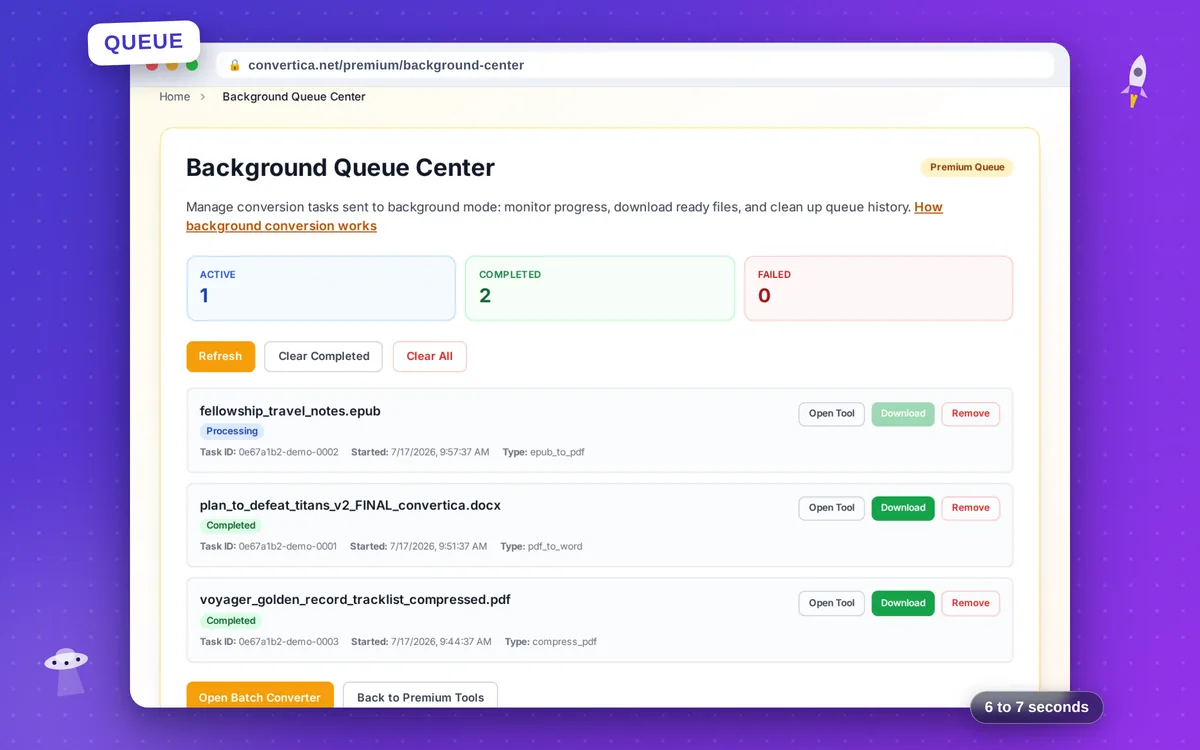
- 3 Follow progress from any page: the queue indicator in the header shows active, finished and failed tasks, and the Background Queue Center lists them in detail.
- 4 Download the result with one click as soon as it is ready — you also get an on-site notification when a task finishes.
Why it's worth it
No babysitting the tab
Conversions run server-side, so you don't have to keep the page open or your computer awake — you can even have the finished file emailed to you.
Priority queue
Premium tasks run on a dedicated high-priority worker, so they start immediately instead of waiting behind free-tier jobs.
Built for heavy jobs
Combine background mode with Premium limits: files up to 200 MB, documents up to 200 pages, and batches of up to 10 files per run.
Private by design
Your task list is stored only in your browser, results are protected by signed task tokens, and finished files are deleted from our servers within about an hour.