Organize PDF
Organize and manage your PDF documents
Video Tutorial
How it works
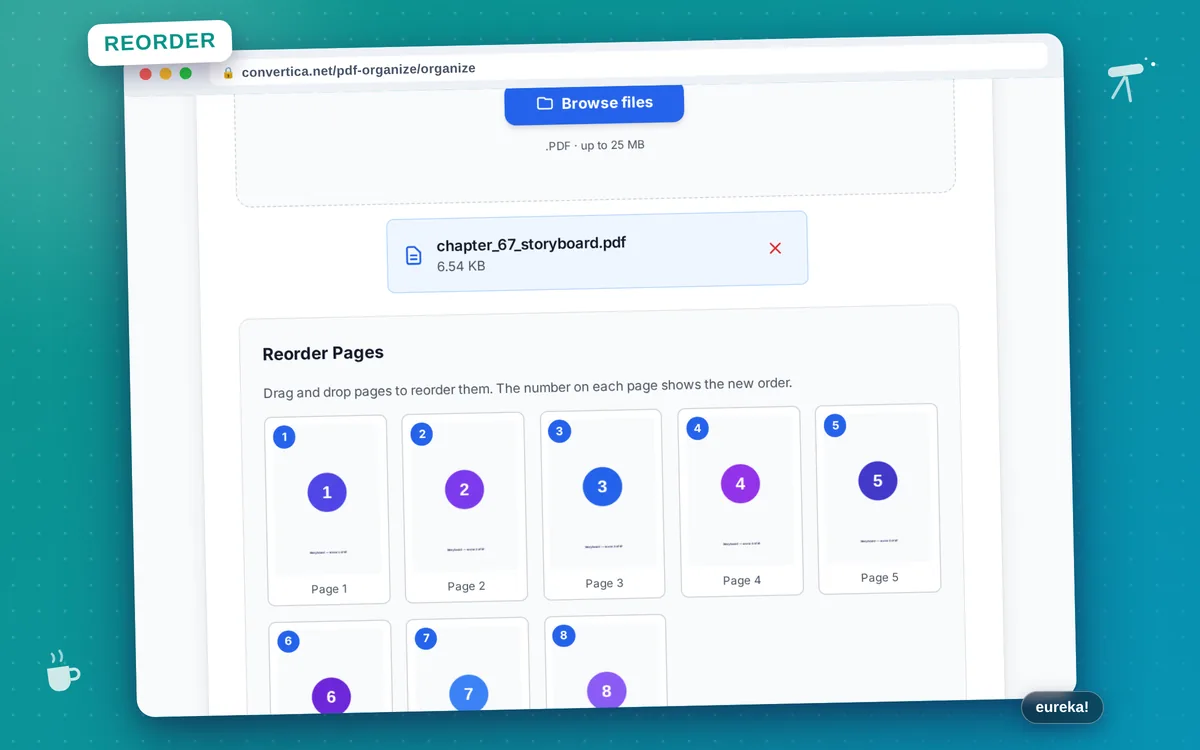
- Select your PDF file using the button above or drag and drop
- Preview pages and drag them to reorder
- Arrange pages in your desired order
- Click Organize PDF to save the new order
- Download your reorganized PDF file
Note: PDF files with up to 30 pages are supported. Drag and drop to reorder pages visually.
Organize PDF Pages - Reorder and Rearrange
Our free PDF organizer lets you reorder pages in any PDF document using simple drag and drop. Perfect for fixing page order, organizing scanned documents, or preparing presentations.
Simply upload your PDF, view page thumbnails, and drag pages to rearrange them. The visual interface makes it easy to see exactly how your document will look. All content and formatting remain unchanged.
Common uses: Fix incorrectly ordered scanned documents, rearrange presentation slides, organize report sections, reorder contract pages, or prepare documents for printing in the correct sequence.
Why Choose Our Tool?
Drag & Drop Reorder
Easily rearrange pages by dragging and dropping
Page Thumbnails
See visual previews of all pages for easy organization
Quality Preserved
Page order changes without affecting content quality
Instant Processing
Save your new page order with one click
Tips for Best Results
- Use page thumbnails to identify pages quickly
- Drag multiple pages at once for bulk reordering
- Review the final order before saving
- Combine with Merge PDF to organize pages from multiple documents
- Use Rotate PDF first if some pages are upside down
Frequently Asked Questions
How do I reorder pages in a PDF?
Can I also delete pages while organizing?
Will reordering affect the document quality?
Can I move multiple pages at once?
Is there a limit on the number of pages I can organize?