
Saved Workflows
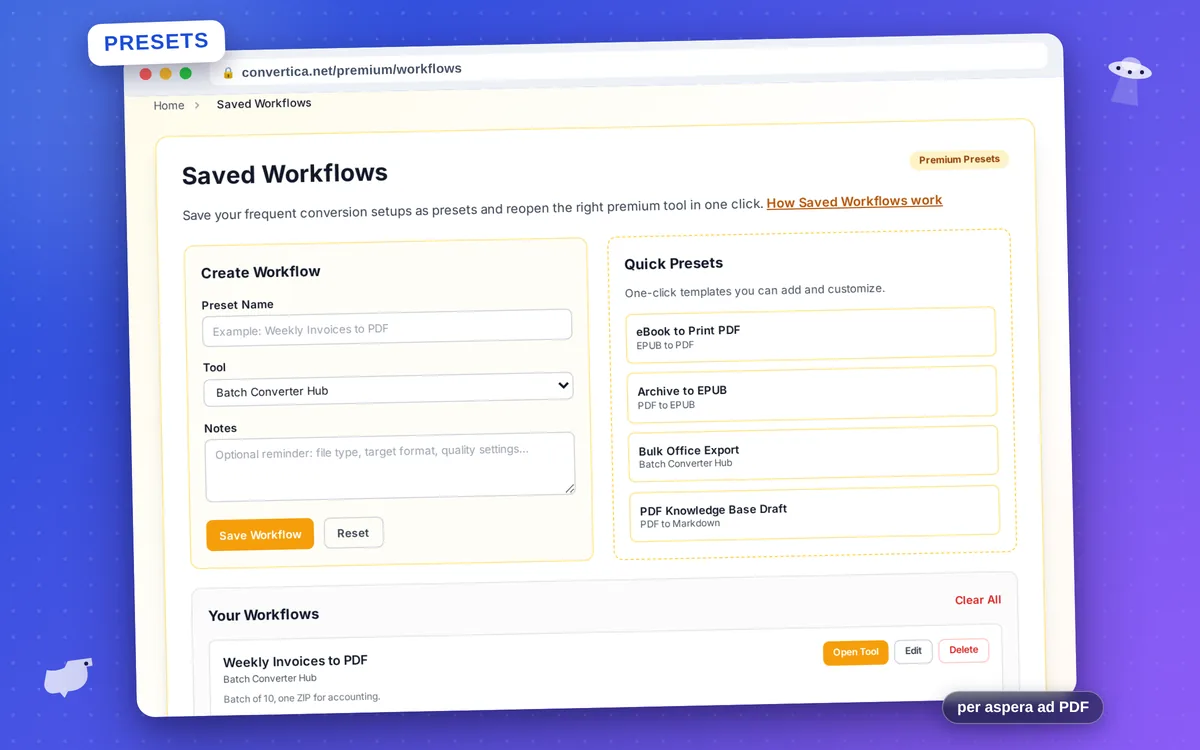
Premium PresetsSome PDF jobs come back every week: invoices to PDF, scans to Word, chapters to EPUB. Saved Workflows turns each of them into a named preset — the right tool plus your own notes — so a routine that used to take a search, a guess and three clicks becomes one.
Presets live in one dashboard. For Premium accounts they sync securely to your profile so the same presets appear on every device you sign in on; signed-out use keeps them in your browser only. Ready-made templates help you start, and every preset stays fully editable.
The Saved Workflows dashboard is part of Convertica Premium, alongside batch processing, background mode and priority queue. Go Premium
How it works
- 1 On any converter, set the options the way you like and hit “Save these settings as a workflow” — the preset remembers the tool and every choice you made.
- 2 Or build one in the Saved Workflows dashboard: name it, pick the tool, add notes — target format, quality, anything you usually forget. One-click templates like “eBook to Print PDF” help you start.
- 3 Next time the job comes around, open your preset — it takes you straight to the right tool with your saved settings already applied and your notes at hand.
- 4 Edit, reorder or delete presets any time. You can keep up to 40 of them.
Why it's worth it
One home for routine jobs
Weekly invoices to PDF, monthly scans to Word, book exports — every recurring task gets a named shortcut in one dashboard instead of a browser bookmark mess.
Notes that remember for you
Attach the details to the preset: which quality to pick, what to check before upload, where the result goes. No more re-figuring settings every month.
Private by design
Presets are stored only in your browser's local storage — they never touch our servers, so your routines stay yours.
Stronger together with Premium
Point presets at premium tools — batch runs, OCR, background mode — and your heaviest routines become one-click launches.