

Why email attachments need extra protection
Standard email between providers is encrypted in transit (TLS) but not end-to-end. That means:- Your email provider can read the contents.
- The recipient's email provider can read the contents.
- If the message gets forwarded, archived, or pulled into a search index, copies sit in places you don't control.
- Shared inboxes (info@, accounts@) often have many more readers than the sender realizes.
- Email backups can persist for seven years or more in regulated industries, even after the original message is deleted from the inbox.
- A subpoena, an internal investigation, or an inadvertent legal hold can pull the message back out of those backups years later.
Step-by-step: encrypt your PDF
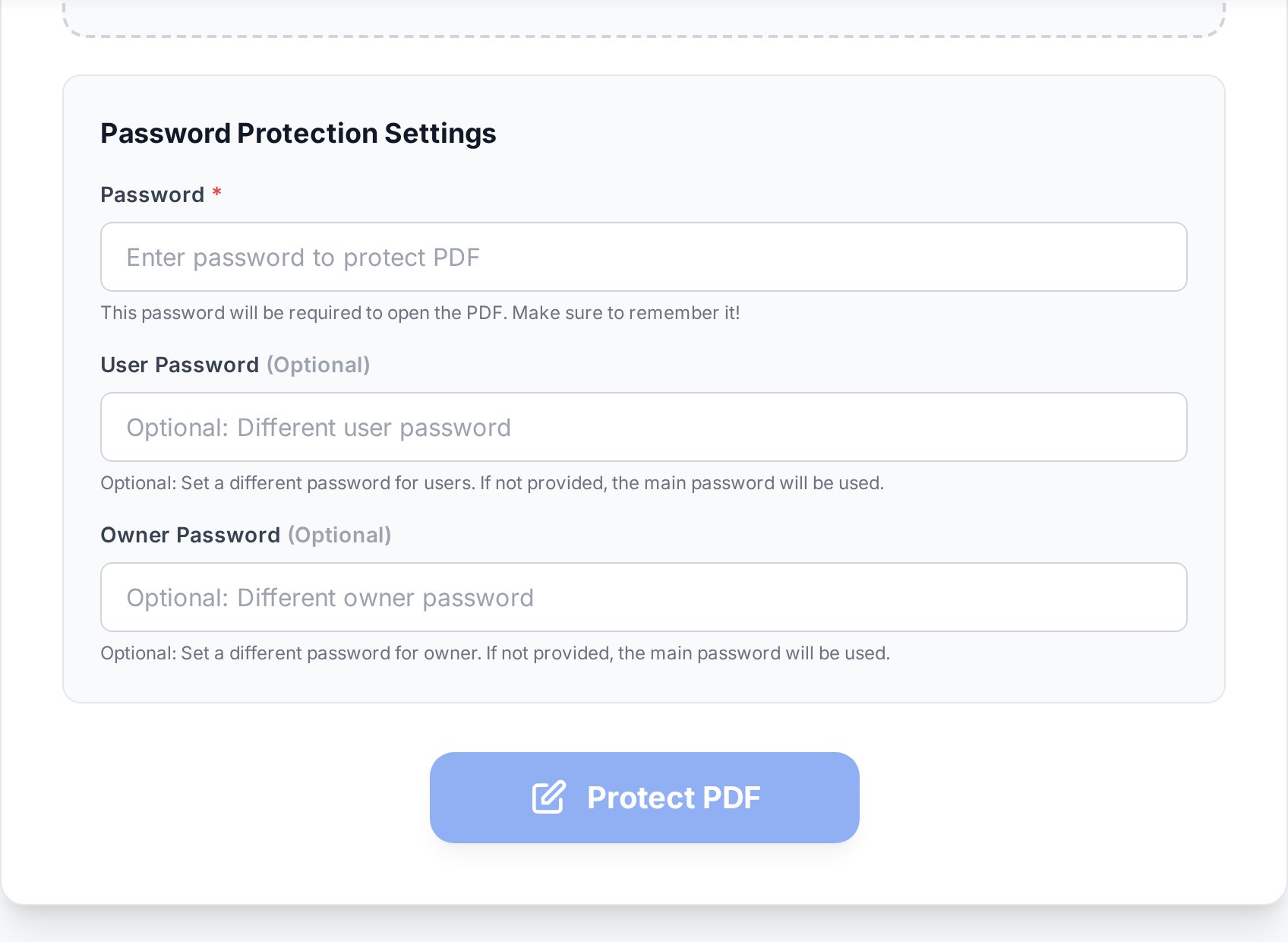
- Open the password-protect a PDF tool and upload your file. The original stays unchanged on your device.
- Set a strong password. The recipient needs exactly this string, so type carefully and paste it from a password manager rather than typing twice.
- Confirm the encryption level. Modern tools default to AES-256, which is the same standard banks and government agencies use. Older RC4 and AES-128 modes still exist for compatibility but should be avoided unless the recipient runs ancient software (Acrobat 8 and earlier, some embedded readers in older industrial systems).
- Download the encrypted file. Open it once yourself with the password to verify everything works, then attach it to your email.
Verify before sending. Open the encrypted file with the password yourself, in a viewer the recipient is likely to use. A surprising number of "encryption broken" complaints turn out to be typos in the password, caught only after the email has gone out.Quirk worth flagging: if you copy a password from a password manager and your manager auto-adds a trailing space or a smart-quote character, the recipient's plain-text password attempt won't match. Strip whitespace and replace any "curly" quotes (' ' " ") with straight ASCII quotes (' ") before saving the password to the manager. This is the silent failure mode for about half the "encryption broken" tickets I've seen colleagues raise. If the document is also a draft or contains sensitive markings, you may want to add a confidential watermark too so anyone who does access it sees clearly that the content is restricted.
How to share the password safely
This is the half of the workflow that gets skipped, and it's the half that determines whether your encryption actually protects anything.Use a different channel
The rule is simple: the password must travel by a route that has nothing to do with the email. Good options:- SMS or messenger. Send the password by text or an end-to-end encrypted messenger like Signal or WhatsApp. The phone number is a separate identity from the email account.
- Password manager share link. 1Password, Bitwarden, and Dashlane all offer "share an item" or "share via link" features that expire after a single view or a set time.
- Verbal handoff in person or by phone. Old-fashioned, but bulletproof. Useful for high-value items going to people you can call.
- Secret-sharing services. Tools like Bitwarden Send or one-time-secret services let you generate a link that destroys itself after one open.
- An out-of-band ticketing system. If both parties use a shared service desk (Jira Service Desk, Zendesk), the password can travel as a private comment that's separate from the email thread.
- "Password is in the next email." Same inbox, same audit trail, same forwarders. The encryption is now a speed bump.
- Password as the subject line. Same problem, with extra visibility.
- Predictable patterns ("password is the recipient's last name"). Anyone who can guess doesn't need the password.
- iMessage between mixed Apple and Android devices. If the recipient isn't on iMessage, the message falls back to plain SMS, which sits unencrypted on carrier infrastructure.
- Voicemail. Many corporate voicemail systems store recordings in inboxes that integrate with email and may be transcribed and indexed.
Choosing a password that won't be cracked
PDF encryption uses the password to derive an encryption key. Weak passwords get brute-forced offline once an attacker has the file. Make it hard.- Length over complexity. A 16-character random string beats a 10-character string with five symbols. "PurpleDolphinChairOcean42" is stronger than "P@55!".
- Avoid personal data. The recipient's name, birthday, company, and pet are all guessable from a quick LinkedIn check.
- Generate, do not invent. Use your password manager's generator. Even a 4-word diceware passphrase is dramatically more secure than something you made up.
- Avoid characters that get auto-corrected. Some keyboards (especially mobile) auto-replace certain ASCII punctuation with smart equivalents. Stick to letters and digits if you're sharing across platforms.
Open password vs permissions password
PDF encryption supports two different passwords, and they do different jobs:| Password type | What it does | When to use |
|---|---|---|
| Open / user password | Required to view the document at all. Without it, the file is unreadable ciphertext. | Anytime the content itself is confidential. |
| Permissions / owner password | Restricts what the viewer can do (printing, copying text, modifying). The doc still opens without it. | For documents that should be readable but not edited or copied (form templates, distributed reports). |
Email tips around the encryption
Two practical notes that bite people often:- Encrypt before compressing. If the PDF is also too large to email, run a compress before encrypting step rather than after. Some compressors quietly re-encode the file in a way that strips encryption.
- Tell the recipient it's encrypted. A short note in the email body ("This PDF is password-protected. I'll send the password by SMS in a moment.") prevents the file from getting flagged as corrupt or quarantined.
- Beware of spam-filter false positives. Encrypted attachments can't be scanned for malware, so corporate spam filters sometimes flag or quarantine them. Warn the recipient to check their spam folder if they don't see the email within a few minutes, and let IT know in advance for high-value sends.
- Don't email yourself the password as a "backup". If anyone breaches your inbox, the file in your Sent folder and the password in your Inbox are now both available. Store the password in your password manager only.
What to do if you forget the password
Keep the unencrypted original somewhere safe. Encryption is symmetric: if you lose the password, the file is effectively unrecoverable through legitimate means. Brute-forcing AES-256 isn't realistic on any normal timescale - the heat death of the sun is the usual humorous estimate. If you own the document and lost the password but still have the original, re-encrypt with a new one and replace the file. If you only have the encrypted copy and you genuinely own the rights to it, there are unlock a PDF you own tools that can attempt removal of weak protections, but they won't crack a strong AES-256 password. (For weak protections - "permissions only" PDFs from 2003-era exports - removal is trivial. For real AES-256 with a long password, give up.)FAQ
Is AES-256 encryption strong enough for legal documents?
Yes. AES-256 is approved for top-secret material by the US National Security Agency and is used by banks, governments, and major cloud providers. The weak link in PDF security is almost always the password, not the algorithm.
Can I send the password in the same email if I delete it later?
No. Email is replicated across servers, backed up, archived, and forwarded. "Delete after sending" deletes only your local copy and does nothing about the dozens of other places the message exists. Use a separate channel.
What happens if the recipient forgets the password?
You re-send the password through a secure channel. If they have lost both the file and the password, you re-encrypt your original with a new password and re-send. There is no recovery code or master key to a password-protected PDF.
Will encryption change the PDF's file size?
Slightly. Encryption adds a few hundred bytes for the security handshake metadata. The actual content is encrypted in place, so a 5 MB PDF becomes maybe 5.001 MB. Not enough to push you across an email size limit.
Can the recipient remove the password after opening?
Yes. Once they have the password, they can remove the encryption with any standard PDF tool. If you need persistent protection that survives the recipient's actions, encryption alone isn't the answer. Combine it with watermarks and a clear access policy, and consider DRM tools for high-value distribution.
Try it now
Lock the file first, then send the key through a different door. Open the PDF protection tool and encrypt your document, then drop the password into Signal, SMS, or your password manager's share link before you hit send on the email.


